 Cart
Cart
 SK
SK



3.3 EditView
The EditView shown in the picture below is divided into two areas:
- Tabs area – allows user to insert into template different kind of values, fields, labels and to set up properties, sharing and other common settings of the pdf template. Tabs area consists of following tabs, which are described in the following subchapters:
- Editing area – is mainly used for inserting/editing your own text, tables, images etc. and to make some design adjustment of the template like font change, color, format, size, background color of the text etc. This editing can be initiated via many toolbars located inside three tabs (Body, Header and Footer) in the above part of Editing area. Please refer to the chapter 4 for the details related to editing.
Note: If you click on Body tab in editing area you are automatically switched to Properties tab. Also if you click on Header tab or Footer tab in editing area then it switches Tabs area to Header/Footer tab.
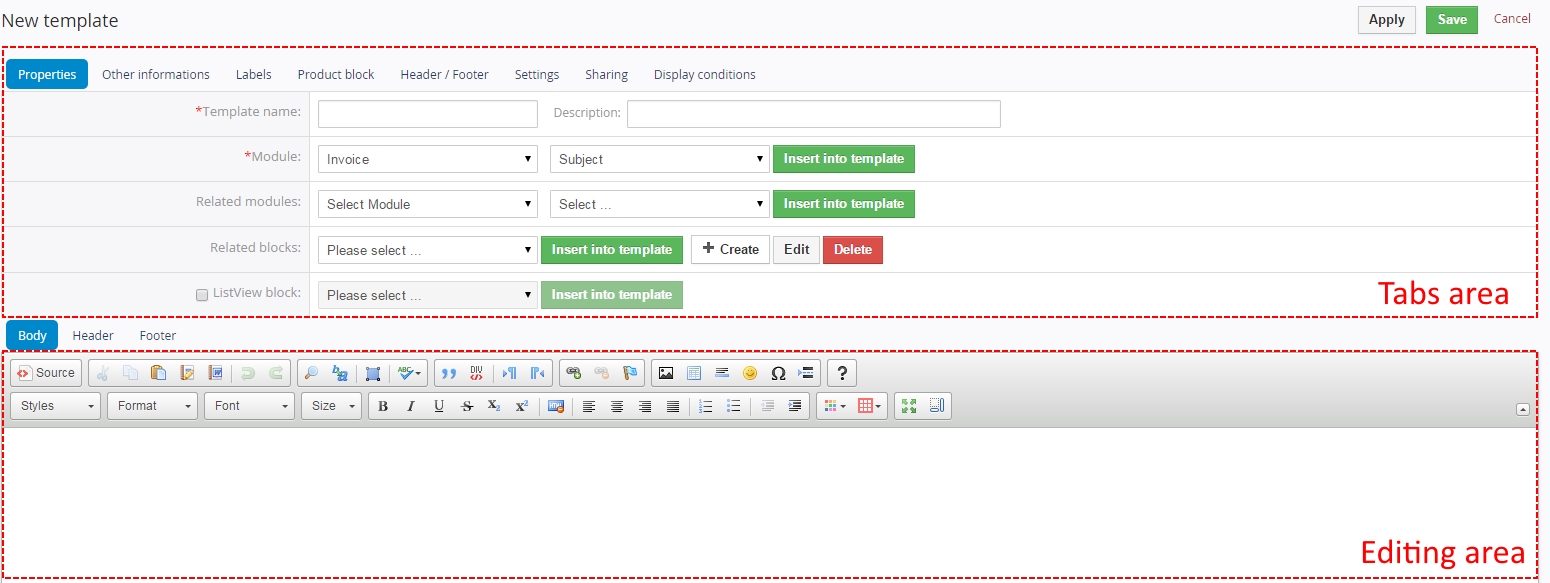
Picture 3.3 PDF Maker New template work area
Properties
The main purpose of the Properties tab is to define template name and module for which pdf will be used. Although description is not required, it is recommended to describe here main purpose and properties of the template for future edit or re-usage.

Picture 3.4 PDF Maker Properties tab
The Properties tab contains fewer items for header and footer part of the pdf template (Picture 3.5).

Picture 3.5 PDF Maker properties tab for header footer
| Name | Description |
|---|---|
| Template name | The name of the template. It is mandatory field for template creation. |
| Description | The description of the pdf template. |
| Module | Template will be based and available only for one selected module and its fields. |
| Related modules | If exists related module(s) to selected module, it is possible here to select and use fields from any related modules. |
| Related blocks | Related block(s) to selected module, with buttons to insert, create, edit or delete related block. For details please refer to chapter 4.6. |
| ListView block | For details please refer to chapter 4.7. |
Other informations
As shown below Other informations tab contains several fields. They are Company and User information, Terms and Conditions, Current date, Barcodes, QR code and Custom functions.

Picture 3.6 PDF Maker other information tab
| Name | Description |
|---|---|
| Company and User information | Comprises group of fields from Company information, Assigned to User and Logged in User.Custom fields also supported. |
| Terms and Conditions | Terms and Conditions. |
| Current date | Current date in several formats. |
| Barcodes, QR code | Several types of Barcodes and QR code. For details please refer to chapter 4.3. |
| Custom functions | Custom functions. For details please refer to chapter 6.4. |
Labels
Labels tab consists of Global language, Module language and Self-defined labels part. Labels are very useful especially in case you need to print/save documents in two or more languages. Please refer to chapter 4.4 to see details.

Picture 3.7 PDF Maker labels tab
| Name | Description |
|---|---|
| Global language | Global labels. |
| Module language | Labels related only to selected module. |
| Self-defined labels | Labels defined by user. |
Product block
The product block tab allows inserting product block template and editing it. In addition, you can create your own product block using “Block start”, “Block end” and fields for products and services. How to insert, edit and create product block is described in chapter 4.5.

Picture 3.8 PDF Maker product block tab
| Name | Description |
|---|---|
| Product block template | Insert predefined and created product block templates. For details please refer to chapter 4.5. |
| Product block | Block start, Block end. Each product block has to start with “Block start” and ends with “Block end” |
| Common fields for Products & Services | Fields common for products & services. You can find same fields for products and services separately as well, but it is recommended to prefer common fields in the templates. |
| Available fields for Products | Fields for products. |
| Available fields for Services | Fields for services. |
Header/Footer
The Header / Footer tab comprises some variables and header/footer settings related to displaying.

Picture 3.9 PDF Maker Header / Footer tab
| Name | Description |
|---|---|
| Header / Footer variables | “Current page”, “Total pages” and “Page/pages”. |
| Display header | Allows defining how to display the header of the pdf document. |
| Display footer | Allows defining how to display the footer of the pdf document. |
Settings
The settings tab allows defining file name, page settings, number format and other settings from usage of template point of view.
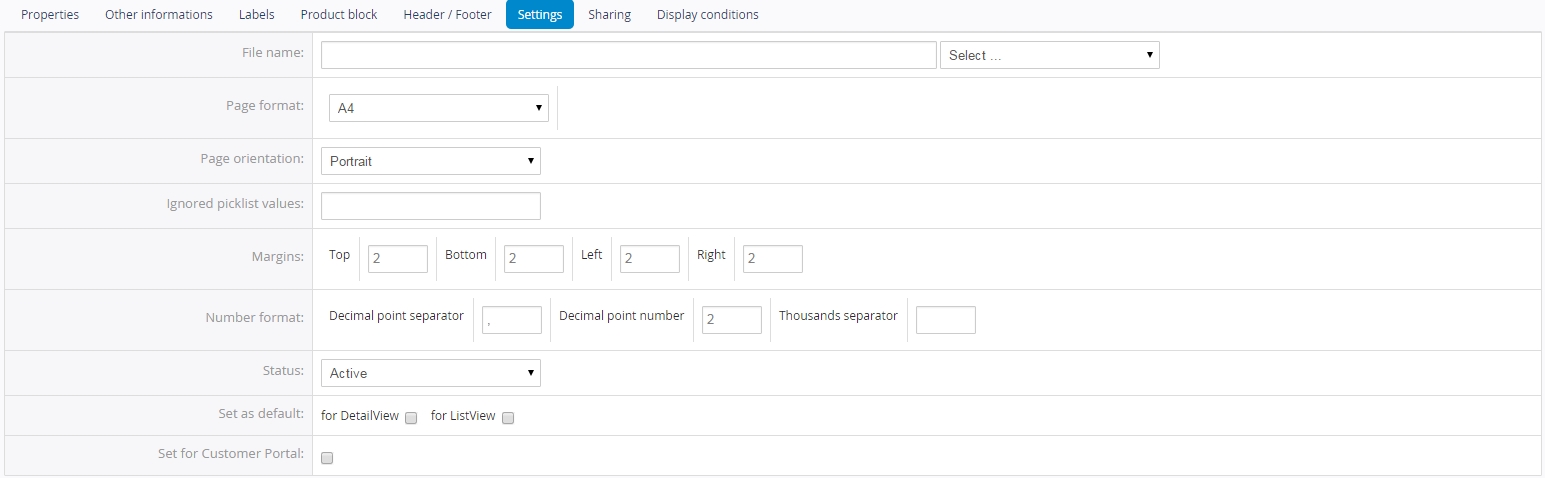
Picture 3.10 PDF Maker Settings tab
| Name | Description |
|---|---|
| File name | File name in different formats. Please refer to chapter 4.9.1 for details. |
| Page format | A3, A4, A5, A6, Letter, Legal or Custom. Custom page format allows to define width and height of the page in mm. Maximum values are 2000 mm x 2000 mm and minimum values are 100mm x 100mm |
| Page orientation | Portrait or landscape |
| Ignored picklist values | Define picklist values which will be ignored in the final pdf document like None, none, keine etc. Entered values have to be separated with comma. |
| Margins | Margins in cm. Maximum value is 9.9 cm and minimum value is 0 cm. |
| Number format | Decimal point separator – comma, dot (but any symbol can be used) Number of decimal points - 0-3 Thousands separator – comma, dot, space (but any symbol can be used) |
| Status | Active / Inactive. Please refer to chapter 0 for details. |
| Set as default | Set/unset as default for DetailView and ListView. For details please refer to chapter 4.9.3. |
| Set for Customer Portal | Set template of Invoice/Quotes for customer portal |
Sharing
The Sharing tab changes depend on whether pdf template is shared (Picture 3.11) or public/private (Picture 3.12). Using this tab you can define how to share your template between you and other users or groups. Please refer to chapter 6.3 to see details.
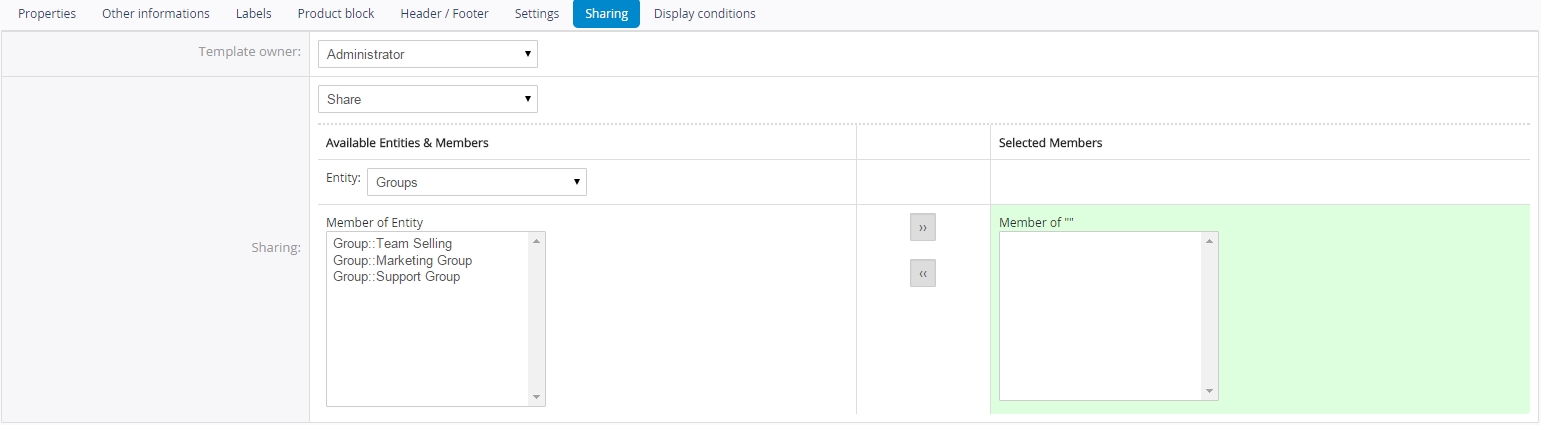
Picture 3.11 PDF Maker Sharing tab/p>

Picture 3.12 PDF Maker Sharing tab for private/public template/p>
| Name | Description |
|---|---|
| Template owner | Select template owner from the list. |
| Sharing | Select “Public”, “Private”, “Share” |
Display conditions
Display conditions tab allows set conditions when template is shown or hidden. If you want to show template without ban, leave conditions empty. There is option to show template if conditions are true or hide templates if conditions are true. You can set it by choosing Yes if/No if in Displayed tab. In Conditions tab you can choose if you want that all conditions must be met or At least one of the conditions must be met. You can add or delete conditions.
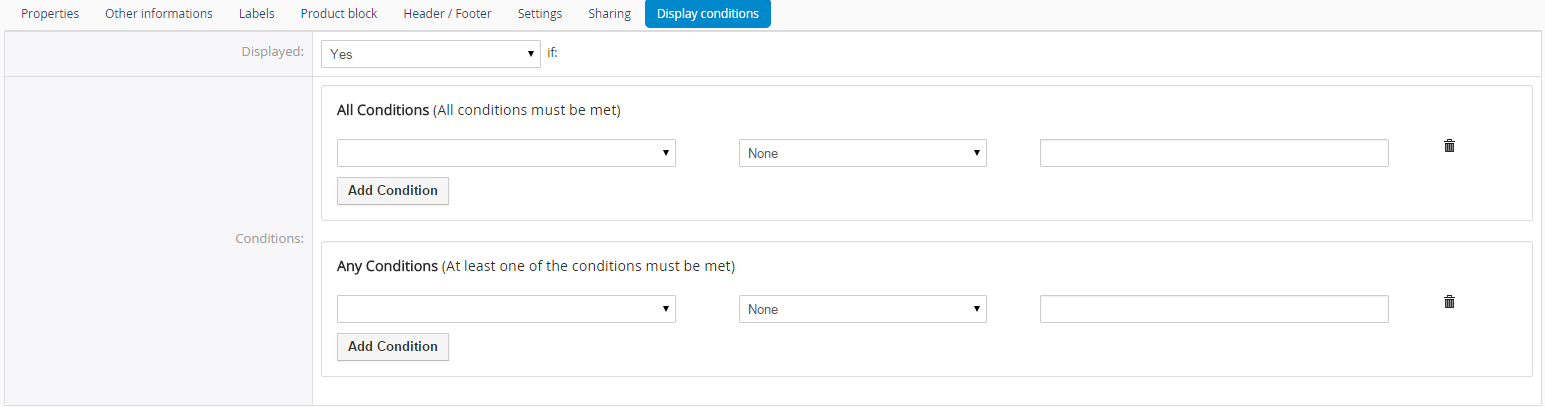
Picture 3.13 Display conditions tab/p>
